Using a cheap MSP-FET430UIF clone on an Apple Silicon Mac
TI's MSP430 tools for the Mac are Intel-only and the clone ships with old firmware. Here's how I built everything natively, upgraded the programmer from the Mac and flashed my board.
I needed to flash an MSP430FR4133 on a board I designed, a click counter with a nine-digit LCD. The programmer was an MSP-FET430UIF clone from AliExpress, $21 with shipping, and the computer a MacBook Pro with an M1 Pro on macOS 27, without Rosetta.
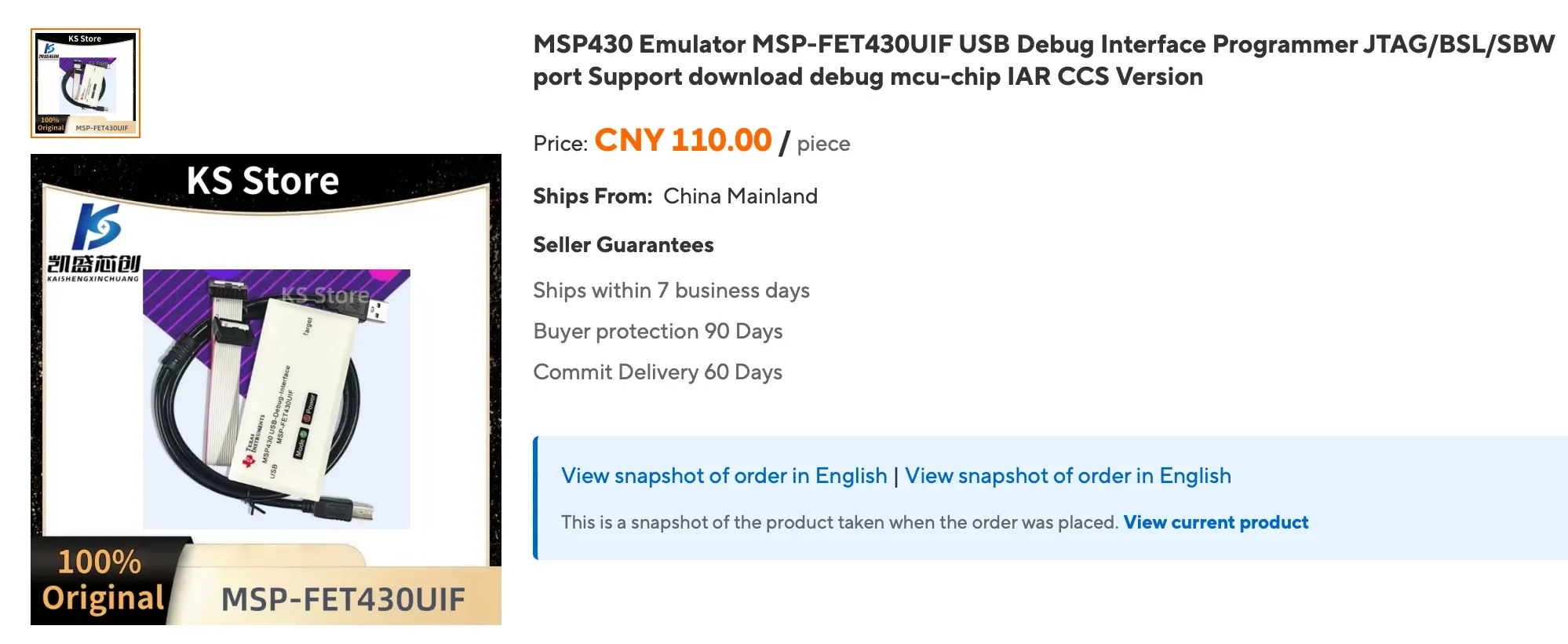
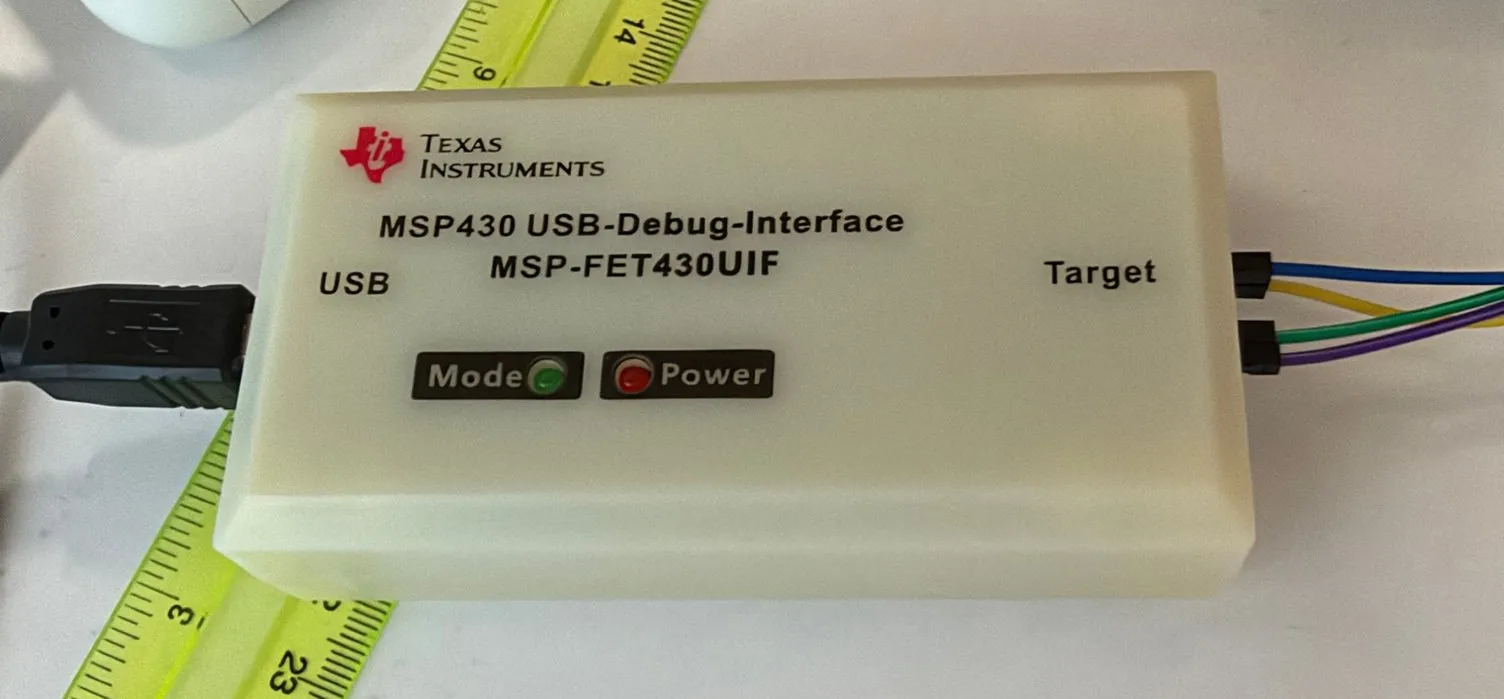
None of the usual instructions worked. Getting from “it’s plugged in, what’s next?” to a flashed chip took about an hour, and most of the problems were not where I expected them. If you have the same programmer and an Apple Silicon Mac, this should get you there faster.
The short version
- Build
msp430-elf-gccnatively. Homebrew doesn’t have it. - Build
mspdebugfrom git with a small patch to its TUSB3410 driver. - Back up the programmer’s old v2 firmware and load Daniel Beer’s
Uifv3Updaterthrough the programmer’s own bootloader. - Build TI’s
libmsp430for arm64, with one extra branch so it recognises the half-upgraded programmer, and let it finish the update. - Check where pin 1 is on the programmer’s header. Mine was not where I assumed.
After that, mspdebug tilib "prog firmware.hex" just works, with no Rosetta and no Windows.
Why it’s hard
Three things get in the way at once.
TI’s Mac tools are Intel-only. As far as I could find, TI’s MSP430 GCC, the debug stack (libmsp430) and Code Composer Studio’s back end all need Rosetta on Apple Silicon. I didn’t want to install it for this. Homebrew has no MSP430 compiler at all; it does have mspdebug, but its tilib driver needs libmsp430, which Homebrew doesn’t ship.
The clone ships with v2 firmware. Mine reported FET protocol version is 20406001, which is firmware 2.04.06.001. In that state it shows up as USB 0451:f430 with a TUSB3410 bridge, and macOS has no driver for it. Only mspdebug’s own uif driver can talk to it, through libusb. TI’s current library only saw the programmer once it was running v3 firmware, when it turns into an ordinary USB serial device.
Homebrew’s mspdebug kept losing the programmer. It found the programmer, loaded the TUSB3410 firmware and read the version, then fell over:
TI3410 device is in boot config, setting active
FET protocol version is 20406001
ti3410: usb_bulk_read: Broken pipe
warning: fet: set VCC failed
ti3410: can't send data: Broken pipe
fet: Spy-Bi-Wire configuration failed
On later attempts it said Device not configured or Result too large, with or without the board attached. So the problem was the USB link, not my board.
1. The compiler
GCC 14.3 builds as a native MSP430 cross-compiler without any patches. Two flags are needed on macOS 27: --with-system-zlib, because GCC’s bundled zlib no longer compiles against the macOS SDK (_stdio.h:322:7: error: expected identifier or '('), and MAKEINFO=true, because without Texinfo the build dies on documentation ('makeinfo' is missing on your system, then Error 127).
I used binutils 2.45, GCC 14.3.0 and newlib 4.5.0.20241231, with gmp, mpfr and libmpc from Homebrew. Newlib goes inside the GCC tree as two symlinks, so one build produces the compiler and the C library:
brew install gmp mpfr libmpc
PREFIX=$HOME/opt/msp430

# binutils
mkdir binutils-build && cd binutils-build
../binutils-2.45/configure --target=msp430-elf --prefix=$PREFIX \
  --disable-nls --disable-werror --disable-gdb --disable-gdbserver \
  --disable-sim --disable-gprofng --with-system-zlib
make -j10 MAKEINFO=true && make install MAKEINFO=true
cd ..

# gcc + newlib in one tree
ln -s ../newlib-4.5.0.20241231/newlib   gcc-14.3.0/newlib
ln -s ../newlib-4.5.0.20241231/libgloss gcc-14.3.0/libgloss
mkdir gcc-build && cd gcc-build
export PATH=$PREFIX/bin:$PATH
../gcc-14.3.0/configure --target=msp430-elf --prefix=$PREFIX \
  --enable-languages=c --with-newlib --disable-nls --with-system-zlib \
  --disable-shared --disable-threads --disable-libssp --disable-libgomp \
  --without-isl \
  --with-gmp=/opt/homebrew/opt/gmp --with-mpfr=/opt/homebrew/opt/mpfr \
  --with-mpc=/opt/homebrew/opt/libmpc \
  --enable-newlib-nano-formatted-io --enable-newlib-reent-small \
  --disable-newlib-supplied-syscalls --enable-newlib-nano-malloc \
  --enable-lite-exit --enable-newlib-global-atexit \
  --disable-newlib-fseek-optimization --disable-newlib-wide-orient \
  --disable-newlib-unbuf-stream-opt --disable-newlib-io-float
make -j10 MAKEINFO=true && make install MAKEINFO=true
On the M1 Pro that took about ten minutes. The chip headers and linker scripts come from TI separately, in msp430-gcc-support-files-1.212.zip. It holds only headers and linker scripts, so the Intel-only problem doesn’t apply. Unpack its include/ folder somewhere and point the compiler at it:
msp430-elf-gcc -mmcu=msp430fr4133 -Os \
  -I$PREFIX/support/include -L$PREFIX/support/include \
  -o blink.elf blink.c
If the linker warns that the ELF has a LOAD segment with RWX permissions, that’s expected: TI’s linker scripts put code and FRAM data in one segment. -Wl,--no-warn-rwx-segments silences it.
2. mspdebug, patched
I built mspdebug from Daniel Beer’s repository against Homebrew’s libusb-compat and hidapi. pkg-config isn’t installed on my Mac, so the paths go in by hand:
brew install libusb-compat hidapi
git clone --depth 1 https://github.com/dlbeer/mspdebug && cd mspdebug
make -j8 WITHOUT_READLINE=1 PREFIX=$HOME/opt/msp430 \
  PORTS_CFLAGS="-I/opt/homebrew/include -I/opt/homebrew/include/hidapi" \
  PORTS_LDFLAGS="-L/opt/homebrew/lib -lusb -lhidapi -framework IOKit -framework CoreFoundation"
mkdir -p $HOME/opt/msp430/libexec && cp mspdebug $HOME/opt/msp430/libexec/
I keep the binary in libexec and put a tiny wrapper on the PATH as ~/opt/msp430/bin/mspdebug. It only matters in step 4, where it’s explained:
#!/bin/sh
DYLD_LIBRARY_PATH="$HOME/opt/msp430/lib${DYLD_LIBRARY_PATH:+:$DYLD_LIBRARY_PATH}"
export DYLD_LIBRARY_PATH
exec "$HOME/opt/msp430/libexec/mspdebug" "$@"
Before building, change one byte in transport/ti3410.c, so the TUSB3410 stops sending modem-status interrupts:
-	static const uint8_t tios_data[10] = {
+	uint8_t tios_data[10] = {
 		0x00, 0x02, /* 460800 bps */
-		0x60, 0x00, /* flags = ENABLE_MS_INTS | AUTO_START_DMA */
+		0x40, 0x00, /* flags = AUTO_START_DMA */
My theory is that nothing on macOS reads the bridge’s interrupt endpoint between commands, the TUSB3410 firmware stalls on the pending interrupt and its watchdog resets the chip. That matches the broken pipes above, but it’s a theory: I never ran unpatched git mspdebug, only Homebrew’s 0.26. Either way, with this build the USB link stayed up for everything that followed. You only need it while the programmer is still on v2.
mspdebug also has to upload firmware into the TUSB3410 every time it connects to a v2 programmer. Homebrew’s mspdebug package carries that file, so I installed it just for that and pointed the new build at it:
export MSPDEBUG_TI3410_FW=$(brew --prefix mspdebug)/lib/mspdebug/ti_3410.fw.ihex3. Back up, then load the updater
Steps 3 and 4 take the programmer through three states. Each one looks different on USB and needs a different tool:
The programmer’s own MCU, an MSP430F161x, has a serial bootloader, and mspdebug’s uif-bsl driver talks to it through the same USB cable. That’s how firmware gets replaced without a second programmer. Daniel Beer describes the procedure on his tilib page and hosts TI’s updater image: Uifv3Updater-1_00_00_00.zip.
First, a backup of the v2 firmware, so there’s a way back:
mspdebug uif-bsl "hexout 0x2500 0xdb00 uif-v2-backup.hex"It took eight seconds and printed Device: MSP430F1611 and BSL version is 1.61 on the way. Then the updater:
mspdebug uif-bsl "prog Uifv3Updater.txt"Writing 4096 bytes at 2500...
Writing 4096 bytes at 3500...
Writing 4096 bytes at 4500...
Writing 3374 bytes at 5500...
Writing 2 bytes at f7f0...
Writing 2 bytes at f7fe...
Done, 15666 bytes total
ti3410: usb_bulk_read: Broken pipe
bsl: failed on command 0x3b (addr = 0x0000, len = 0x0000)The error at the end is expected: the updater starts running and the old USB device goes away. About eight seconds later a new one appeared on its own, 2047:0010 “MSP430_JTAG”, now a standard USB serial device at /dev/cu.usbmodem*. No replugging, and no more TUSB3410 firmware or patches. The update isn’t finished yet, though: the updater is only a small core that waits for TI’s library to install the real v3 firmware.
4. libmsp430 for arm64
libmsp430 is the open-source part of TI’s MSP Debug Stack. I used MSPDebugStack_OS_Package_3_15_1_1.zip. It builds natively without changes to its Makefile once you know three things:
- It needs Boost 1.85 or older. It still uses
boost::asio::io_service, which newer Boost removed, so Homebrew’s currentboostdoesn’t work butboost@1.85does. - Homebrew’s Boost has only the
-mtnames for the threaded libraries. I linked the static archives, so the finished dylib doesn’t depend on Boost. - The Makefile’s macOS
OUTNAMEhas no separator and produces-install_namelibmsp430.dylib. OverridingOUTNAMEon the command line fixes that.
brew install boost@1.85 hidapi
B=/opt/homebrew/opt/boost@1.85/lib
export CPLUS_INCLUDE_PATH=/opt/homebrew/opt/boost@1.85/include:/opt/homebrew/include/hidapi:/opt/homebrew/include
make OUTNAME="-Wl,-install_name,@rpath/" \
  LIBS="-lbsl430 $B/libboost_filesystem.a $B/libboost_system.a \
        $B/libboost_date_time.a $B/libboost_chrono.a \
        $B/libboost_thread-mt.a $B/libboost_atomic-mt.a \
        -framework CoreFoundation -framework IOKit -L/opt/homebrew/lib -lhidapi"
cp libmsp430.dylib $HOME/opt/msp430/lib/
Run that in the unpacked package and out comes an arm64 libmsp430.dylib. Then mspdebug tilib --allow-fw-update is supposed to finish the update. With the stock library it doesn’t:
Found FET: usbmodem1201
Firmware version is 31501001
MSP430_VCC: 3000 mV
tilib: MSP430_VCC: Could not set device Vcc (error = 10)
Two things in that output are misleading. 31501001 is not the programmer’s firmware but the library’s own version, 3.15.1.1, which it prints when it thinks no update is needed. And error 10 is the library not recognising the programmer at all.
The cause is in DLL430_v3/src/TI/DLL430/FetControl.cpp. The updater core reports hardware ID 55 FF 40 01 with a HAL version of 1.0.1.196. The library recognises an old UIF only by a HAL version between 3.0 and 3.3, so this one falls through to 0x1111, a dummy tool that never gets updated and can’t set the target voltage. One more branch sends it to the UIF update path:
else if (fetHwVersion[0] == 0x55 && fetHwVersion[1] == 0xFF &&
         fetHwVersion[2] == 0x40 && fetHwVersion[3] == 0x01 &&
         HalVersion.get() < 30000000)
{
    // MSP-FET430UIF running TI's Uifv3Updater core (HAL 1.0.1.x)
    fetToolId = 0xCCCC;
    fetCoreVersion = (el->getOutputAt16(8));
}
Put it right after the existing else if (HalVersion.get() <= 30300000 && HalVersion.get() >= 30000000) branch and rebuild. Then:
$ mspdebug tilib --allow-fw-update "exit"
FET firmware update is required.
Starting firmware update (this may take some time)...
Initializing bootloader...
Erasing firmware...
Programming new firmware...
    51 percent done
    ...
Update complete
That took about 70 seconds. Now the programmer runs v3 firmware 3.15.1.1 with HAL 3.11.0.1, the versions that ship with this library.
This is where the wrapper from step 2 earns its place. mspdebug loads libmsp430.dylib at run time, so the library’s folder has to be on DYLD_LIBRARY_PATH. But macOS strips DYLD_* variables whenever it starts a protected system binary, so an exported variable is lost as soon as something like /usr/bin/perl or /bin/sh sits between your shell and mspdebug. I got tilib_api: can't find libmsp430.dylib that way. The wrapper sets the variable itself and then runs mspdebug directly, so nothing can strip it.
5. Where pin 1 is
With the software done, I still got this:
tilib: MSP430_OpenDevice: Unknown device (error = 5)The programmer reported it was putting out 3.05 V, yet the chip’s JTAG ID read as 0x00. I suspected the soldering, the contacts and even the chip’s rotation on the board. The real problem was simpler: my jumper wires were mirrored on the programmer’s 14-pin header.
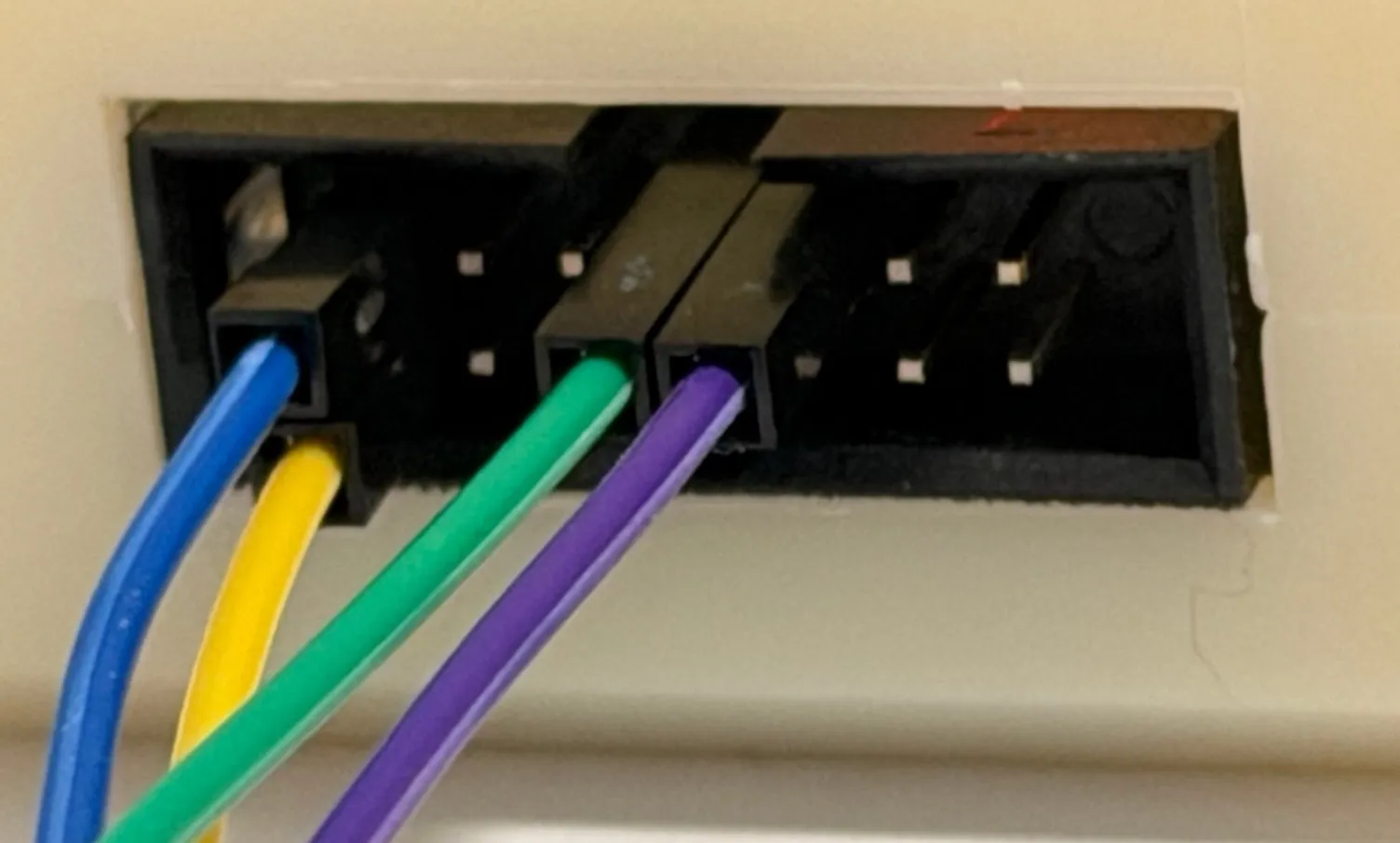
The header has a key groove and no other marking. The groove only tells you which row holds the odd-numbered pins; it doesn’t tell you which end is pin 1. On my clone, looking straight at the programmer’s header with the groove up, pin 1 is the top-right corner. The top row reads 13, 11, 9, 7, 5, 3, 1 from left to right, and the bottom row 14 down to 2. I had assumed top-left. A little red dot near the top-right corner looked like a pin 1 mark too, but it turned out to be the reflection of a red LED.
If you have a multimeter, check for continuity between the USB connector’s shell and the pin you think is 9 (GND) before you trust either guess. For Spy-Bi-Wire, four wires are enough:
| FET430UIF pin | Signal | MSP430 side |
|---|---|---|
| 1 | TDO/TDI | SBWTDIO (RST/NMI) |
| 7 | TCK | SBWTCK (TEST) |
| 9 | GND | GND |
| 2 | VCC_TOOL | DVCC |
Pin 2 powers the board from the programmer at 3 V, so take any battery out first.
Mirrored, that wiring damaged nothing: the board simply wasn’t powered. After I moved three wires, the output changed to Device: MSP430FR4133 [FRAM], and a few minutes later the first firmware was on the chip:
$ mspdebug tilib "prog clikme.hex"
Writing 1194 bytes at c400...
Writing    2 bytes at fffe...
Done, 1196 bytes total
What the errors meant
If you landed here from a search, this is the list I wish I’d had.
ti3410: usb_bulk_read: Broken pipe, thenfet: Spy-Bi-Wire configuration failed: Homebrew’smspdebuglosing the v2 programmer over USB. The patched build from git fixed it.fet: FET returned error code 4 (Could not find device or device not supported): nothing answered on the target side. For me, that was the mirrored wiring.Firmware version is 31501001: the library’s own version, not the programmer’s firmware.MSP430_VCC: Could not set device Vcc (error = 10)right after the updater: the library doesn’t recognise the half-upgraded UIF. It needs the extraFetControl.cppbranch.MSP430_OpenDevice: Unknown device (error = 5)while the programmer reports ~3 V: wiring. Check pin 1 first.tilib_api: can't find libmsp430.dylib:DYLD_LIBRARY_PATHdidn’t reachmspdebug. Use the wrapper script._stdio.h:322:7: error: expected identifier or '('while building GCC: GCC’s bundled zlib. Configure with--with-system-zlib.'makeinfo' is missing on your system, thenError 127: no Texinfo. RunmakewithMAKEINFO=true.unknown argument: '-install_namelibmsp430.dylib': the MSPDS Makefile’sOUTNAME. Override it.ld: library 'boost_thread' not found: Homebrew names itboost_thread-mt. Link the static-mtarchives.
From the first ioreg to the first flashed chip took about an hour, and the firmware upgrade itself less than five minutes. If you remember only two things from this post, make them the extra branch in FetControl.cpp and where pin 1 is.